What's new in Bank Boost: May 2026
Discover what’s new in Bank Boost for May 2026, including statement imports, Ask Your Tracker, personal spending workspaces, recurring payments, cashback comparison and a new matched betting course.
May was one of the biggest update months yet for Bank Boost.
The main theme was simple:
Make Bank Boost less manual, more useful, and better connected to how people actually manage their money.
Here’s what changed in Bank Boost in May 2026, and how each update helps.
30-second version
In May 2026, several major updates were added to Bank Boost:
Bank statement import for the Profit Tracker, including CSV and PDF support.
Ask Your Tracker, so you can ask questions like “how much did I spend yesterday?” or “what was my bank switch profit?”
Personal workspace, so you can track everyday spending separately from Bank Boost income.
Recurring payments, helping you monitor subscriptions, direct debits, free trials and cancellation dates.
Cashback comparison, so you can compare shopping routes before you buy.
Matched betting for beginners, a full course for users who want to learn the basics properly.
Bank Boost is becoming less manual, more intelligent, and more useful for everyday money decisions.
1. Bank statement import comes to Profit Tracker
Until now, the Profit Tracker has been useful for tracking money made from bank switches, cashback offers, side hustles and other Bank Boost activity.
But there was one obvious problem.
Manual entry takes time.
If you forgot to update your tracker for a few weeks, or wanted to add lots of real spending data, it could feel like a chore.
So in May, we added bank statement import.
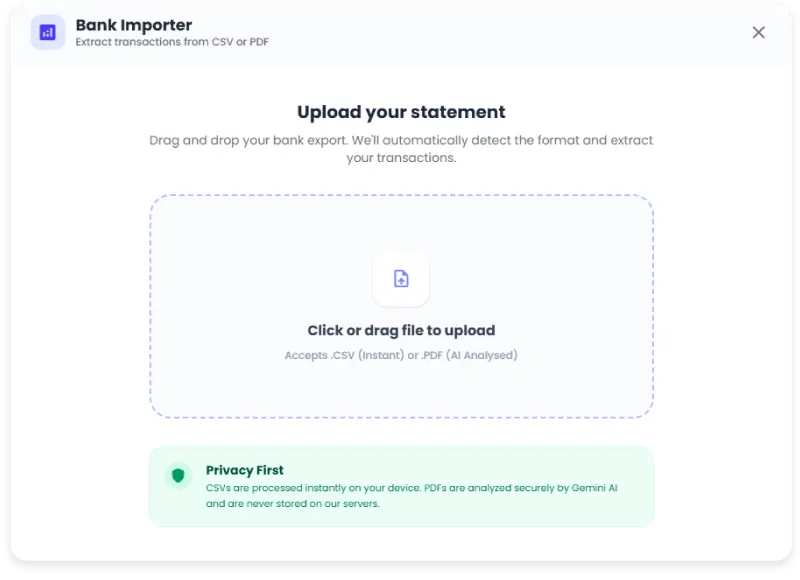
You can now upload a bank export and bring transactions into your Profit Tracker much faster.
The importer supports:
CSV files
PDF bank statements
drag-and-drop upload
category editing
duplicate detection
recurring payment detection
workspace matching
That means you are not just blindly dumping a statement into your tracker.
You can upload the file, review the extracted transactions, choose what to keep, fix anything that needs changing, then confirm the import.
Why this matters
This update makes the Profit Tracker much easier to keep up to date.
Instead of manually adding every subscription, bill, cashback payment or spending entry one by one, you can import a statement and tidy it up from a review screen.
That is especially useful if you want to:
catch up after a busy month
track spending from a specific account
import personal expenses
spot recurring payments
add lots of historical transactions
check whether your tracker matches your real bank activity
For me, this is one of the biggest quality-of-life improvements we’ve made to the tracker.
It turns the Profit Tracker from something you have to constantly maintain into something you can update in batches.
Import, review, then confirm
The important part is the review step.
After uploading your file, you can check the imported transactions before they are saved.
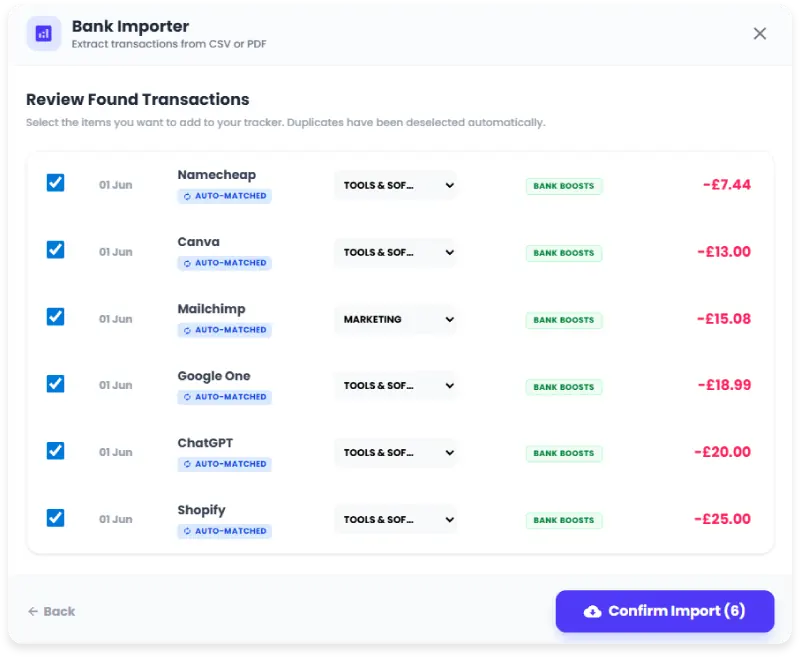
That means you can:
remove anything you do not want to track
change the category
switch a transaction between income and expense
check whether something has been marked as a duplicate
check whether something has been auto-matched as recurring
This matters because bank statement data is not always perfect.
Merchant names can be messy.
Categories can need tweaking.
Some payments are personal.
Some payments belong in your Bank Boost tracker.
Some payments should not be imported at all.
The review screen gives you control before anything is added.
2. Ask Your Tracker
The next big Profit Tracker update is Ask Your Tracker.
This is exactly what it sounds like.
Instead of manually filtering your ledger, adding totals, checking categories or searching through entries, you can ask your tracker a question in plain English.
For example:
“How much did I make this month?”
“What was my bank switch profit?”
“How many offers did I complete this month?”
“How much did I spend yesterday?”
“What are my biggest expenses?”
“What is my subscription total?”
“How much did I spend on groceries?”
“What was my best income source?”
Ask Your Tracker works with the data inside your tracker, so the answers are based on the entries you have added or imported.
It also understands which workspace you are using.
So if you are in the Bank Boosts workspace, the suggestions focus on things like offers and bank switch profit.
If you are in the Personal workspace, the suggestions focus more on spending, subscriptions and everyday money.
Why this matters
This is a big step away from the tracker being just a table of entries.
You can now use it more like a money assistant.
That is useful because the questions people actually have are usually simple:
Did I make money this month?
Where did my money go?
Which offer type is working best?
How much am I spending on recurring payments?
Am I actually keeping the profit I’m making?
Ask Your Tracker is designed to make those answers easier to find.
You do not need to export a spreadsheet.
You do not need to manually filter every category.
You can just ask.
3. Personal workspace in Profit Tracker
Until now, the Profit Tracker was mainly focused on Bank Boost activity.
That meant things like:
bank switch rewards
cashback
referral profit
side hustle income
offer-related expenses
That is still a major part of the tracker.
But in May, we added a new Personal workspace.
This lets you track everyday spending separately from your Bank Boost income.
So instead of mixing everything together, you can now separate:
Workspace | Best for |
|---|---|
Bank Boosts | Cashback, offers, side hustle income, bank switches, referrals and profit tracking |
Personal | Bills, groceries, dining, subscriptions, shopping and everyday spending |
This is a big change.
It means the Profit Tracker is no longer only about tracking how much you made from offers.
It can also help you understand where your normal money is going.
Personal categories
The Personal workspace is designed for everyday categories such as:
Home & bills
Food & groceries
Dining & social
Transport
Shopping
Subscriptions
Health & fitness
Travel
Other spending
You can use it to track normal life spending without messing up your Bank Boost numbers.
That separation matters.
If you make £250 from a bank switch and spend £70 on groceries, those two things should not really sit in the same mental bucket.
One is offer profit.
The other is everyday spending.
The new workspace setup helps keep those stories separate.
Why this matters
Bank Boost income and personal spending tell two different stories. The Personal workspace lets you track everyday categories like bills, groceries and subscriptions without mixing them into your cashback wins, bank switch rewards or side hustle profit.
Net Profit vs Net Balance
The workspace also changes the way the tracker talks about your money.
In the Bank Boosts workspace, the focus is Net Profit.
That makes sense because you are usually tracking money made from offers, minus any costs.
In the Personal workspace, the focus is closer to Net Balance.
That makes sense because you are looking at money in, money out, and what is left.
It is a small wording change, but it matters.
The same tracker can now work for two different jobs:
How much did I make?
How much did I keep?
4. Recurring payments are easier to track
Another major May update is the recurring payments tool.
This is designed to help you keep track of payments that repeat.
That could include:
subscriptions
free trials
direct debits
memberships
app payments
insurance payments
bill payments
bank switch direct debits
cancellation or expiry dates
Recurring payments are easy to forget.
A £3.99 subscription here, a £7.99 trial there, a £12.99 membership somewhere else — it adds up quickly.
The recurring tool is designed to make those payments easier to spot and manage, especially across multiple bank accounts.
New subscriptions found
One of the most useful parts of this update is how it connects with bank statement imports.
When imported transactions look like they might be recurring, Bank Boost can surface them as New Subscriptions Found.
From there, you can review them and decide what to do.
You can:
approve the payment and link it to your recurring dashboard
dismiss it if it is not actually recurring
keep your tracker cleaner
avoid missing payments that repeat quietly in the background
This is the kind of feature that becomes more useful over time.
The more complete your tracker is, the easier it becomes to see which payments are repeating.
Mark entries as recurring
You can also mark a tracker entry as recurring manually.
That is useful when you notice a payment and want it tracked in the recurring dashboard.
For example:
Netflix
Spotify
gym membership
phone bill
broadband
credit card repayment
bank switch direct debit
free trial renewal
The goal is simple:
If a payment repeats, Bank Boost should help you notice it before it quietly keeps costing you money.
5. Cashback comparison tool launched
May was not only about the Profit Tracker.
We also launched the cashback comparison tool.
This is designed for one of the most common Bank Boost problems:
Where should I start before I shop?
Cashback can be messy.
One retailer might have a rate on TopCashback.
Another might be better on Quidco.
There might be a gift card discount somewhere else.
A rewards app might have a better temporary offer.
A card-linked offer might stack differently.
The cashback comparison tool is designed to make that decision easier.
Instead of checking lots of places manually, you can compare routes before you buy.
Why this matters
The cashback comparison tool is there to help you make a better decision before you buy.
The aim is not just to find cashback.
It is to find the best route for that purchase.
6. Matched betting for beginners course launched
We also launched a full matched betting for beginners course.
Matched betting can be confusing when you first hear about it.
There are free bets, qualifying bets, odds, exchanges, liability, lay bets, back bets, tracking, bookmaker terms and lots of small details that matter.
The new beginner course is designed to make the process easier to understand from the start.
It gives users a more structured way to learn the basics before trying anything.
The course is built for people who want to understand:
what matched betting is
how free bet offers work
why odds matching matters
how to think about qualifying bets
what common beginner mistakes to avoid
how to track profit properly
why terms and conditions matter
how to stay disciplined
Since matched betting is one of the most popular side hustles in the UK, I thought this would be the best place to start for the Side Hustle section of the app. There will be many more side hustle courses on the way to keep stacking profits long term.
You can find the Matched Betting for Beginners course here.
Important
Matched betting involves bookmaker accounts and gambling products. Only use it if you are comfortable with the risks, never deposit money you cannot afford to lose, and avoid it entirely if gambling has caused problems for you.
7. Smaller Profit Tracker improvements
Alongside the headline features, May 2026 also included smaller improvements that make the Profit Tracker feel more complete.
These are the kinds of updates that may not need their own announcement, but they make a real difference when you use the app regularly.
Tracker Toolkit
The Profit Tracker now has a more useful toolkit area.
This gives quicker access to things like:
Categories
Templates
Recurring Entries
Statement Import
Action History
Export Data
That makes the tracker easier to manage.
Instead of hunting around for settings or tools, the main actions are grouped together in one place.
Action History and undo
We also added an Action History area.
This gives you a feed of recent actions across the Profit Tracker and Recurring tool.
It can help with those moments where you think:
What did I just change?
Did I delete the wrong thing?
Can I reverse that?
Where supported, actions can be undone.
That should make the tracker feel safer to use, especially when importing or editing lots of entries.
Better highlights
The tracker also has better highlight cards.
These can help you quickly spot useful things like:
top income sources
biggest expenses
key categories
where the money is coming from
where the money is going
This is useful because not every insight needs a full report.
Sometimes you just want to know:
What mattered most this month?
Better charts and mobile insights
The analytics area has also been improved.
The tracker can show different chart views, including trend and category-style views, and the layout is more workspace-aware.
That means the tracker feels more relevant whether you are looking at Bank Boost profit or personal spending.
The mobile experience has also been improved, so insights are easier to access on smaller screens.
Workspace-aware exports and settings
The Personal workspace also changes how settings and exports work.
You can manage categories, templates and data tools with the active workspace in mind.
That means you can keep Bank Boost tracking and personal tracking separate when managing your data.
This is especially useful if you want to export one side without mixing it with the other.
What May’s updates mean for Bank Boost
The big picture is this:
Bank Boost is becoming more connected.
Before, you might have used separate tools for everything:
one app for cashback
one spreadsheet for profit
one note for subscriptions
one bank statement for spending
one guide for matched betting
one calculator for totals
May’s updates move more of that into Bank Boost.
You can now:
find cashback routes
import real transactions
track Bank Boost income
track personal spending
ask questions about your data
monitor recurring payments
learn matched betting
compare before you shop
That is the direction we want to keep building in.
Not just “here are some offers”.
But:
Here is a better way to find, track, understand and keep more of the money you make.
Have an idea for a new Bank Boost feature? Head to your account page and send a suggestion!