Account Setup & Your First Offer
We’re going to cover how to set up your profile (it takes about 30 seconds), how to navigate your dashboard, and most importantly, how to bank your very first win today.
Account Setup & Your First Offer 🚀
Hey! If you’re reading this, you’re likely staring at a fresh Bank Boost account and wondering, "Okay, where do I start?"
First off - welcome! 👋 You’ve taken the first step towards turning your spare time into spare cash.
This guide is going to be short, sweet, and practical. We’re going to cover how to set up your profile (it takes about 30 seconds), how to navigate your dashboard, and most importantly, how to bank your very first win today.
Let’s get into it.
1. Setting Up Your Profile 👤
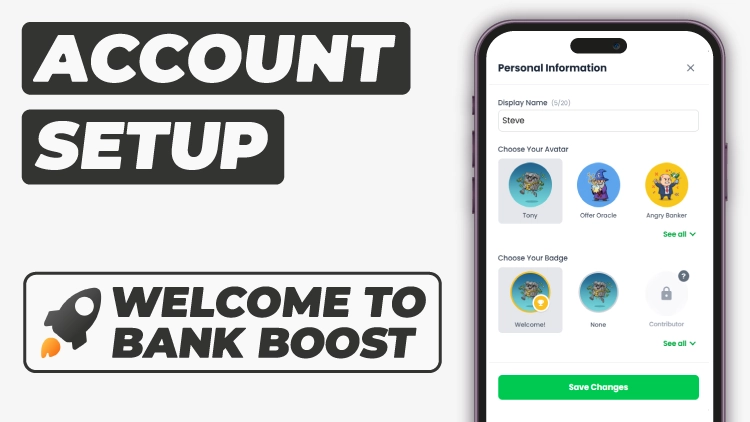
We don’t do long, boring forms here. When you first log in, you might have seen a pop-up asking for a few basics. If you skipped it (or just want to change things up), here is what you need to know.
To access your profile settings, just click your avatar in the top right corner on desktop, or for mobile, open the sidebar, and tap ‘Account’.
What you can customise:
Display Name: This is how you’ll show up in the community. It doesn’t have to be your real name - nicknames are totally fine.
Avatar: Pick a character that matches your vibe. We’ve got a whole library of them, and spoiler alert: you can unlock cooler ones (and shiny badges) just by using the app.
💡 Pro Tip: Your "Monthly Goal" is automatically calculated when you join based on how many days are left in the month. Don't panic if it looks specific! You can edit this anytime by clicking the pencil icon next to your goal on the dashboard.
2. Finding Your First Offer 🎯
Okay, profile sorted. Now for the money.
Head over to your Dashboard. This is your mission control. You’ll see sections for Top Picks, Expiring Soon, and Recent Activity.
If you are suffering from "choice paralysis" (we've all been there), we built a tool specifically for you: The Offer Machine.
It’s a big, shiny button on your dashboard that spins through our verified offers and picks a high-rated one for you at random. It’s fun, it’s fast, and it stops you from overthinking it.

Alternatively, you can just browse the Top Picks section. These are usually the highest-paying or easiest offers available right now.
3. Using the Guides 📘
Once you click on an offer, you’ll be taken to its corresponding Guide.
We’ve written these to be "Netflix-proof"—meaning you can follow them even if you’re half-watching a show.
Here is the workflow for a perfect offer:
Read the "What You Need" section: Do you need ID? A spare £1? 5 minutes? Check this first.
Hit "Mark In Progress": This is crucial. It moves the offer to your In Progress list so you don't lose it, and it unlocks the tracking tools.
Use the Checklist: As you complete steps (like "Download App" or "Verify ID"), tick them off in the sidebar. It saves your progress automatically.
4. Marking an Offer Complete ✅
Once you’ve followed the steps in the guide and completed the offer, head back and mark it as Complete.
When you do this:
The offer moves to your Completed tab, so you don’t accidentally try to do the same one again (some offers can be repeated, but most are one-time only)
Your profit total updates automatically
You can view completed offers in two places:
The Completed tab in the offers section
The Profit Tracker, where everything you’ve earned is logged in one place
That’s it — no extra admin, no spreadsheets, and no guessing what you’ve already done.
🙌 Final Word
That’s literally it. You find an offer, follow the checklist, and mark it complete.
Bank Boost handles the boring stuff—remembering what you did and when—so you can focus on stacking those wins.
Go spin that Offer Machine and let us know in the community what you get!
– Steve
Roadmap unavailable
This roadmap is not currently available publicly.